

Most estates treat vCenter as an administrative tool: it has a login page, the administrators use it, and it is patched when VMware publishes a fix. That puts the most powerful system in the data centre on the same footing as the intranet. Whoever controls vCenter controls every host it manages, and through the hosts, the disk of every virtual machine, including the domain controllers.
Patching is not a sufficient defence for something that valuable, because the vulnerability that matters is the one nobody has published yet. In an intrusion Google Threat Intelligence Group and Mandiant described in November 2026, an espionage group exploited a vCenter flaw in early September. VMware disclosed it on 19 November. For more than two months, an estate that patched on the day every fix appeared was still open.
What holds in that window is reach. If an attacker who has landed on an ordinary internal machine cannot open a connection to vCenter’s management ports, the exploit has nowhere to go. That makes the firewall around vCenter, and who controls it, the decision that matters most.
How the November 2026 intrusion reached vCenter
The attackers did not start at vCenter, and nothing about the route was exotic until the end.
They entered through a remote support appliance, using a separate zero-day in that product. From
there they moved to an internal Linux appliance that had no endpoint detection, planted a web shell,
and made themselves root. Then they scanned the internal network for ports only VMware uses: 2012,
5480 and 9080, along with the /sdk and /ui paths on 443.
Port 2012 carries vCenter’s single sign-on directory service. The new vulnerability let anyone who
could reach it obtain an authenticated session as administrator@vsphere.local without a password.
With that session, their tooling copied the directory database, extracted the private key the
security token service uses to sign SAML assertions, and created a new SSO administrator.
The signing key is the part that should worry anyone running vSphere. With it, an attacker forges login tokens for any user, and multi-factor authentication never gets the chance to object, because the forged token is the result of authentication rather than a request for it. Mandiant calls this a Golden SAML attack.
From there the sequence went:
- They enabled SSH on the appliance through the management API, connected, and took the vCenter master encryption key and the PostgreSQL database credentials. Then they switched SSH off again.
- They signed in to the ESXi hosts, as root and as the account vCenter itself uses, and added an SSH key to root’s authorised keys.
- They read guest disks straight off the VMFS datastore and extracted a domain controller’s NTDS database and its SYSTEM and SECURITY registry hives.
- They archived the files and pulled them back to the remote support appliance, from which Mandiant believes they left the network. A backdoor on another Linux appliance took its commands from a Slack channel.
Root on the hypervisor reads a domain controller’s disk without ever logging in to it.
Step three is the one to sit with. Nothing inside the domain controller saw anything, because nothing happened inside it. Every control on the guest was irrelevant to an attacker reading the disk file from underneath. Any server virtualised on that platform is protected only as well as the platform.
Why the built-in firewall is not the answer
vCenter ships with a firewall, managed through the appliance management interface on port 5480. Mandiant’s assessment of it is blunt, and it comes down to four properties.
| Property | Why it matters |
|---|---|
| No per-port rules | Letting the backup server reach the API on 443 means trusting it on every port, so a compromised backup server gets SSH and 5480 as well. |
| Administered from inside | The rules live behind 5480. An attacker who can use that interface, as this one did to enable SSH, can switch the firewall off. |
| No logging of denials | A refused connection leaves no trace, so a scan of the management ports is invisible to whoever watches the logs. |
| Inbound only | Nothing governs what the appliance connects out to, so stolen data and command traffic leave freely. |
The second row is the general principle. A control that can be turned off with the access it is meant to contain does not contain that access. Wherever the rules are enforced, it has to be somewhere a vCenter administrator, or someone holding a forged vCenter administrator token, cannot change from inside vCenter.
The firewall that would have stopped it
Mandiant’s recommendation is to enforce the rules in the appliance’s Linux kernel with iptables, independent of the management interface, and it published a script that does so. Whether you use that script, a firewall in front of the management segment, or both, the policy is the same.
- Ports restricted
- 22, 443, 2012, 5480
- Inbound default
- deny, logged
- Outbound default
- deny the internet
- Break glass
- appliance console via the ESXi host
This diagram as text
- Allowlisted sources
- Admin workstations — privileged access only
- ESXi hosts — management subnet
- Backup servers — API clients
- Any other internal host — dropped and logged — all ports, 2012 included
- vCenter appliance — Photon OS, iptables default deny — rules outside the management interface
- DNS, NTP, directory — allowed out
- SIEM — shell commands and drops
- Internet — egress denied
Relationships
- Admin workstations → vCenter appliance — 22, 443, 5480
- ESXi hosts → vCenter appliance — 443
- Backup servers → vCenter appliance — 443
- Any other internal host → vCenter appliance — drop
- vCenter appliance → DNS, NTP, directory
- vCenter appliance → SIEM — syslog
- vCenter appliance → Internet — drop
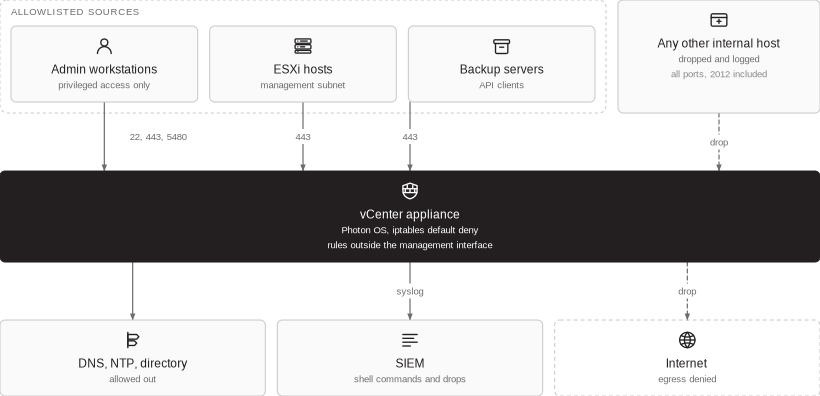
Deny inbound by default, and allow per port. SSH and the management interface are reachable from the administrators’ workstations and nothing else. The API on 443 is reachable from those workstations, the ESXi management subnet and the backup servers. Port 2012 is closed to everything not on an explicit list. In this intrusion, the exploit came from a Linux appliance that had no reason to talk to vCenter at all, and with that rule it would never have reached the directory service.
Do not rely on one port being closed. Mandiant’s table walks through each stage. Even if the signing key had been taken some other way, the forged tokens would have been useless from that appliance, because it could not reach 443. The request to enable SSH would have been dropped too, and so would the SSH connection after it.
Deny outbound as well. vCenter needs to reach DNS, NTP, the directory and its hosts. It does not need the internet. Denying everything else blocks the copy out and the command channel, both of which this group used. The script offers three postures, and the one it recommends blocks public internet access while allowing internal ranges; the strictest drops everything not listed and only works if the list is complete.
Keep the evidence off the box. The attackers deleted their tools and output files once they were done. Logs that exist only on the appliance can be removed the same way. Forward the shell commands run on the appliance, and every dropped connection, to a SIEM. A dropped connection to port 2012 from a host that has never spoken to vCenter is a far earlier warning than anything a patch advisory provides.
What it costs, honestly
This is not free, and the tool’s own documentation says so.
- Lockout. A wrong allowlist cuts off management access the moment it is applied. Recovery is through the appliance’s console on the ESXi host, so confirm that path works before you start.
- Support. The changes depart from VMware’s default configuration and may affect your support agreement. Know where you stand before a support call depends on it.
- Inventory. You need the real list of addresses that talk to vCenter: administrators’ workstations or jump hosts, the ESXi management subnet, the backup servers, DNS, NTP and the directory. Building that list is most of the work.
- Backup traffic. The script’s rate limiting bans an address that opens more than six connections a minute, and its documentation warns that some backup products open many streams at once. Test a full backup run before you rely on it.
Mandiant advises rigorous testing and formal change control before any of this reaches production. Run the dry-run mode, apply it to a non-production vCenter first, and keep the rollback commands where the person on call can find them.
If changing the appliance is not acceptable, the network can carry the same policy: vCenter on a management segment with a firewall in front of it that applies the same per-port allowlist and egress rules, administered by someone other than the vSphere administrators. What you lose is the appliance’s own record of shell commands, so the syslog forwarding still matters.
What to check in an estate you already run
- What can reach port 2012. Test from an ordinary server and an ordinary workstation. If either connects, so could the exploit.
- Where administrators work from. If vCenter is administered from the same laptop that reads email, the allowlist protects very little. Mandiant’s guidance points to privileged access workstations.
- Who could turn the firewall off. If the only rules are the appliance’s own, the answer is anyone holding vCenter administrator rights.
- What vCenter is allowed to connect out to. Try reaching a public address from the appliance.
- What is alerting. SSH being enabled on the appliance, a new SSO administrator, and a new key in an ESXi host’s authorised keys are all things this group did, and all things that rarely happen for a legitimate reason.
- Which appliances on the management network have no endpoint detection. The foothold in this intrusion was a Linux appliance nobody was watching, reached from a remote support appliance.
None of this replaces the patch. Apply Broadcom’s fixes as they are published. The firewall is what stands between the attacker and vCenter for the months before the next one exists. For what happens if vCenter is lost anyway, backups that survive ransomware covers keeping a copy the platform’s administrators cannot delete, and on-premise clusters covers the platform itself.
How STP approaches this
We start a vSphere review from an ordinary internal host, testing which of vCenter’s ports answer and which ESXi hosts accept SSH, because that shows the exposure faster than any configuration export. We then build the inventory of what genuinely needs to reach vCenter, move administration onto dedicated workstations, and put the per-port allowlist and egress rules where the vSphere administrators cannot quietly undo them, with the logs going to a SIEM someone actually reads.
More on private cloud and networking, or start a conversation.