

Ask whether the backups would survive a ransomware attack and the answer is usually yes, followed by a description of where they are kept. Offsite, replicated, on a different array. All of that is true, and none of it answers the question, because location is not what the attacker cares about.
Ransomware operators look for the backups first. CISA puts it plainly: many ransomware variants attempt to find and then delete or encrypt accessible backups, so that restoring is impossible unless the ransom is paid. An attacker who has reached administrator credentials can reach every copy those credentials can reach, wherever it sits.
So the question to ask of a backup estate is narrower and less comfortable. Which copy can the person holding your administrator password not touch, and when did you last restore from it?
The rule that was written before the threat
The 3-2-1 rule has served for a long time: three copies of the data, on two different types of media, with one copy offsite. It protects well against a failed disk, a deleted file and a lost building. Veeam, whose guidance sets out the extended version, notes that the original rule was not designed with ransomware, immutable storage or public cloud in mind.
The gap is that every copy in a classic 3-2-1 estate is usually reachable from the same management plane. The backup server writes to the local repository, copies to the offsite one, and holds the credentials for both. That is convenient for operations and equally convenient for an intruder who compromises the backup server or the domain it trusts.
3-2-1-1-0 adds two numbers to close that gap:
- One copy immutable or offline. Data that, once written, cannot be altered or deleted for a set period, or that has no live connection at all. NIST SP 800-209 defines immutability as the ability to lock data after it has been created, preventing alteration or deletion.
- Zero errors on verification. The backups are proven by restoring from them, not by reading a green status in the console.
A backup that administrator credentials can delete is not protection from an attacker who has them.
How attackers get to the backups
NIST SP 800-209 describes the behaviour in more detail than most vendor material, and it is worth reading for that alone. Three patterns matter for an estate of ordinary size.
Privilege escalation. An attacker with elevated rights on the storage or backup management system can delete volumes and compromise existing backup copies, including snapshots, and interfere with the generation of future ones. Nothing exotic is required. The same console your team uses is the attack surface.
Poisoning the future. Where the existing copies cannot be reached, NIST notes an attacker can interfere with the backup process itself and wait, so that by the time production is attacked, the only clean copies are too old to be useful. The defence is retention that reaches further back than an intrusion is likely to go unnoticed, combined with monitoring that treats a change in backup behaviour as a security event rather than an operations ticket.
Poisoning the images. The same document describes attackers infecting the copies used to rebuild: operating system images, software packages, even source repositories. A clean rebuild from a poisoned golden image hands control straight back. CISA’s guidance to keep golden images and templates offline, and to version and audit infrastructure-as-code templates, answers exactly this.
What makes a copy actually immutable
Immutability is a property of where and how a copy is stored, and of who can change that. A retention lock that an administrator can switch off with the same credentials the attacker now holds is a delay, not a protection.
NIST SP 800-209 sets out what isolation for a cyber-attack recovery copy should look like:
- Separate storage. In a private cloud, physically separate storage systems. In a public cloud, a separate account or its equivalent.
- Separate management. The recovery copies are managed from systems that production cannot reach, and that cannot be accessed with regular credentials, including the credentials of the ordinary backup system.
- Narrow access. For sensitive data, a very small group with credentials not used for day-to-day work, so a compromised administrator account does not open the vault.
- Offsite. Physically elsewhere, so access to the production site is not access to the copy.
Object storage with object lock in write-once, read-many mode is the common way to meet this in practice, and both AWS and Azure offer it natively. CISA adds two cautions worth repeating: immutable storage does not satisfy every regulation’s criteria, and a misconfigured retention lock can impose significant cost, because you cannot delete what you locked by mistake. Decide the lock period before you enable it, not after the first invoice.
- Three copies
- counting production
- Two media
- local disk and locked object storage
- One offsite, one immutable
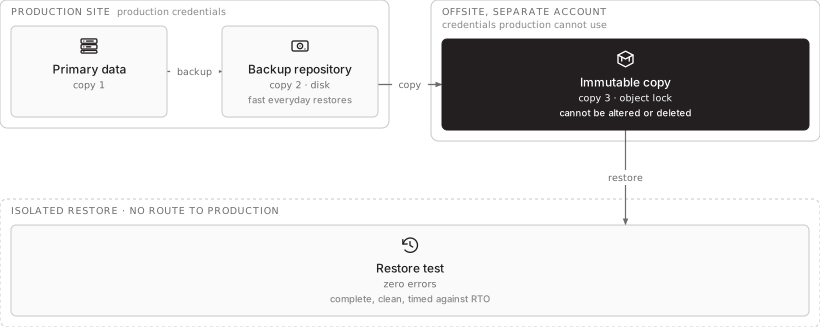
- here the same copy, under separate credentials
- Zero
- proven by a restore, not by a job status
This diagram as text
- Production site production credentials
- Primary data — copy 1
- Backup repository — copy 2 · disk — fast everyday restores
- Offsite, separate account credentials production cannot use
- Immutable copy — copy 3 · object lock — cannot be altered or deleted
- Isolated restore · no route to production
- Restore test — zero errors — complete, clean, timed against RTO
Relationships
- Primary data → Backup repository — backup
- Backup repository → Immutable copy — copy
- Immutable copy → Restore test — restore
A strict air gap, with no network path at all, goes further still. NIST describes both strict implementations and lighter ones that open the data path only for a scheduled sync. For most estates an immutable copy under separate credentials is the sensible line; the strict version is for the data whose loss the business could not survive.
Zero is the number most estates skip
Every backup console reports successful jobs. A successful job means data was written. It does not mean the data restores, that the restore is complete, or that it finishes inside the recovery time the business agreed to.
NIST’s section on restoration assurance is direct about why this matters: organisations often have backups of their critical systems but do not regularly check whether they can be used, and then find, through configuration drift, environmental change or a deliberate attack, that they cannot. Its recommendations reduce to four checks:
- Restore, and time it. A periodic test restore that completes and meets the required recovery time.
- Check completeness. Recovery needs more than the volumes: databases, certificates, encryption keys, configuration, and the dependencies around them such as Active Directory and DNS. A restored server that cannot authenticate is not restored.
- Validate on a schedule. At least once a year, and more usefully at roughly one to one and a half orders of magnitude below the backup frequency, so daily copies are checked every couple of weeks to monthly.
- Check for infection. Scan recovery copies for malware, and keep a record of which were scanned.
The isolated restore that proves most of this is the same exercise described in what a real disaster recovery test looks like: restore into a network with no route to production, verify, measure.
Recovering without reinfecting
When the day comes, the instinct is to restore straight back into production. Both CISA and NIST advise against it. Restore into an isolated staging environment, check the restored executables, images and data for the malware that began the incident, and only then promote them. CISA’s response checklist warns specifically about dropper malware hidden in backups, and about reinfecting clean systems during recovery.
This is also why NIST recommends keeping data separable from the application that uses it, so the data can be restored without restoring the infected code around it. Rebuild the application from a known-clean image or template, then attach the restored data.
How STP approaches this
We run backup to the 3-2-1-1-0 rule with Veeam, Commvault, or open-source tools such as Bacula, Bareos, restic and BorgBackup, with one copy immutable and under credentials that production and day-to-day administration cannot use. That copy is held in our partner data centre in Armenia, a facility certified Tier III by the Uptime Institute, or in AWS, Google Cloud or Azure. Every backup estate we take on starts with two questions: which copy survives a stolen administrator password, and when it was last restored. The restore tests are scheduled and their results written down.
More on Backup-as-a-Service and Disaster-Recovery-as-a-Service, or start a conversation.