

Most complaints about office Wi-Fi are design faults rather than hardware faults. The access points went where the ceiling was convenient rather than where people sit, they run at full power on channels nobody planned, and nobody measured the coverage after the installer left. Buying newer access points carries every one of those decisions forward.
Vendor guidance has been consistent on this for years. Cisco Meraki strongly encourages surveys both before and after a wireless deployment, so the radio environment is understood rather than assumed. A practitioner writing for Wireless LAN Professionals describes the same failures from the field: hallway-only access points in a building with thick walls, so people gathered in the corridors because the rooms had no signal.
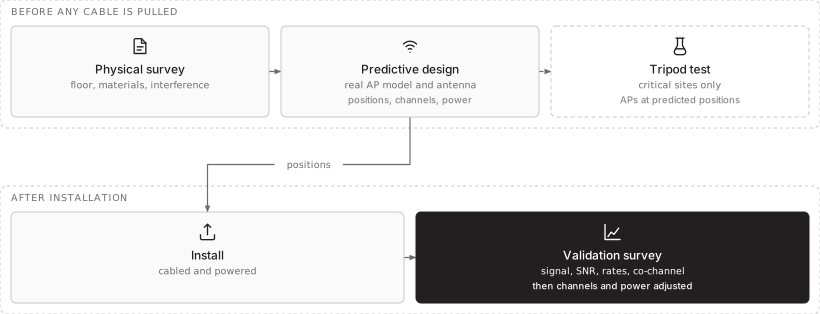
This article is about the order of work that avoids that: survey, design, install, then prove.
What a survey measures that a catalogue cannot
A datasheet tells you what an access point can do in free space. Your office is not free space. Concrete, metal, glass and furniture absorb and reflect signal differently, the neighbours run their own networks, and the phones your staff carry have weaker antennas than the laptop used to test coverage. Meraki’s RF design guidance notes that smartphone and tablet antennas are typically the weakest link, which is why it advises surveying for the worst clients rather than the best.
A useful survey records the building as it is: floor area, wall materials, where people gather and where nobody goes, where cable can run, and what else is transmitting nearby. Where floor plans are missing or out of date, this physical survey comes first, because every later step depends on it.
Coverage is a property of the building, not of the access point.
Predictive design, and what it cannot see
A predictive survey models the floor in software. The walls and windows are drawn with their attenuation, the antenna pattern of the actual access point model is loaded, and the tool proposes how many access points are needed, where, and on which channels and power. The output is a heat map and a list of mounting positions that the installers can cable to.
It is a plan, and it has limits that are worth stating plainly. The Wireless LAN Professionals article notes that a predictive design provides no information about interference, because it cannot know what the neighbours are running. It also warns against the two shortcuts that do the most damage: letting the tool place access points automatically, and using a generic access point model instead of the real antenna pattern of the hardware being bought. Change the vendor and the design has to be redone.
For critical or unusual sites there is a step in between. Access points are mounted temporarily on tripods at the predicted positions and measured, before any cable is pulled. It is expensive and covers only a sample of the floor, so it is worth doing where the cost of a wrong design is high and not on every small office.
- Cell edge
- around -67 dBm for a voice-grade design
- Signal to noise
- 25 dB or more for data clients
- Co-channel
- neighbours not heard above -82 dBm
This diagram as text
- Before any cable is pulled
- Physical survey — floor, materials, interference
- Predictive design — real AP model and antenna — positions, channels, power
- Tripod test — critical sites only — APs at predicted positions
- After installation
- Install — cabled and powered
- Validation survey — signal, SNR, rates, co-channel — then channels and power adjusted
Relationships
- Physical survey → Predictive design
- Predictive design → Tripod test
- Predictive design → Install — positions
- Install → Validation survey
Channels are the scarce resource
Access points that hear each other on the same channel share the airtime, so adding more of them in the wrong way makes every one slower. Meraki’s channel planning guidance is direct: access points with overlapping coverage should be set to different non-overlapping channels. In 2.4 GHz there are only three non-overlapping channels in its count, which is why it calls that band a poor choice for dense deployments.
5 GHz has far more room, especially where the channels shared with radar are used. Those channels come with a rule: an access point that detects radar must leave the channel immediately. Channel width matters too. Bonding channels to 40 or 80 MHz looks faster on paper and halves or quarters the number of channels available to separate neighbouring access points, so Meraki recommends 20 MHz, or manual width selection, in dense offices.
Power is the other half. Leaving every access point at full power makes cells overlap so much that they interfere, and makes phones cling to a distant access point. Automatic channel and power features help, but Meraki notes they may not be aggressive enough in dense spaces, where settings should come from survey measurements instead.
| What you set | The usual mistake | What survey-led design does |
|---|---|---|
| Placement | Where the ceiling or cable was easy | Where people work, from the floor survey |
| Channels | Left on automatic with overlap | Planned so neighbours never share a channel |
| Width | Widest available | Narrow enough to keep enough channels |
| Power | Maximum | Sized so cells overlap enough to roam, no more |
Validation is the step that proves it
The validation survey happens once the network is running, ideally after it has operated for a day or more so the automatic tuning has settled. It measures signal, signal-to-noise ratio, data rates and co-channel interference across the floor, and compares them with acceptance criteria agreed before installation. The Wireless LAN Professionals article calls it the most important survey of all, because it captures every factor the model could not, and a good-looking heat map on its own says nothing about throughput or interference.
Meraki’s site survey guidance gives working figures for an office designed with voice in mind: a cell edge around -67 dBm, and a consistent signal-to-noise ratio of 25 dB or more for data clients. Its RF design guide adds that access points should not hear each other on the same channel above -82 dBm. Your criteria may differ, but they should be written down before the survey, not decided after it.
Separate the guests, and retire the shared password
Design is also where security is decided. Guest devices belong on their own network with internet access only, so a visitor’s laptop never shares a segment with your systems. The Wi-Fi Alliance’s Enhanced Open mode gives an open guest network encryption without a passphrase to print on a card.
Staff devices should not use a shared password at all. A passphrase known to every current and former employee cannot be withdrawn from one person. 802.1X, the IEEE standard for port-based access control, requires each device to authenticate before it is admitted, which is how WPA3-Enterprise networks work. The Wi-Fi Alliance notes WPA3 is mandatory for Wi-Fi CERTIFIED devices, so current hardware supports it.
Finally, the advice in Meraki’s RF guide that is easiest to follow: things that do not move should be wired. A printer or a desktop on Wi-Fi uses airtime the laptops and phones need.
How STP approaches this
We design office Wi-Fi from a survey of the building with the access point model that will be installed, on HPE Aruba, Cisco or Sophos equipment, and we cable and power the access points ourselves. After installation we run a validation survey against criteria agreed in advance, and separate guest and corporate traffic with 802.1X for staff devices. Where the Wi-Fi already exists, we survey it first and change the channel and power plan before recommending any new hardware.
More on Wireless-as-a-Service and Network-as-a-Service, or start a conversation.