

Hybrid Exchange is usually described as a migration step. In practice it is an architecture, and frequently a long-lived one, so it is worth building deliberately rather than as a sequence of wizard defaults.
Two things decide whether it is calm or painful: where identity is authoritative, and where mail flow enters.
Identity is authoritative in exactly one place
The on-premise directory synchronises to the cloud, and while it does, it remains the source of truth for the objects it owns. Attributes flow one way. Editing a synchronised attribute in the cloud either fails or is overwritten at the next cycle, which is the single most common source of confusion in a hybrid estate.
- Authoritative identity
- on premise, for as long as sync runs
- Recipient edits
- on-premise Exchange tooling only
- Free/busy
- both directions, from day one
- Transport
- TLS enforced on the connectors
This diagram as text
- On premise
- Active Directory — authoritative for identity
- Entra Connect — one way, outbound only
- Exchange server — recipient management stays here
- Remaining mailboxes — during transition
- Microsoft 365
- Exchange Online — mailboxes
- Entra ID — synchronised identities
Relationships
- Active Directory → Entra Connect
- Entra Connect → Entra ID — sync
- Exchange server ↔ Exchange Online — connectors
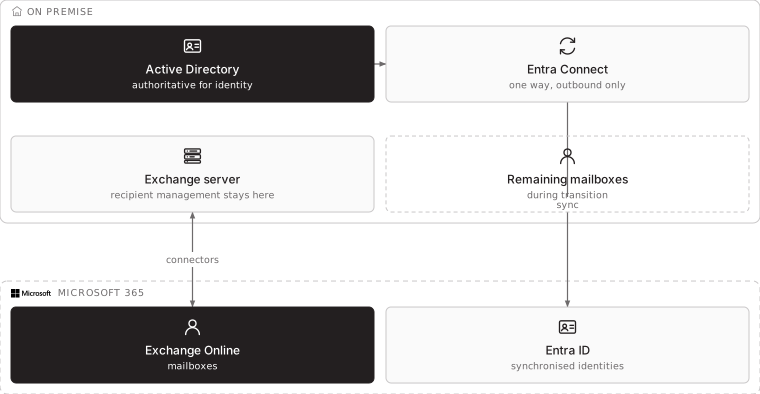
This is also the answer to the question every organisation eventually asks: why can the last Exchange server not be switched off. While the local directory is synchronised, recipient attributes are owned there, and the supported way to edit them is the on-premise Exchange management tooling. Removing the server and editing attributes directly in the directory is unsupported and produces failures that are difficult to attribute.
Authentication is worth deciding explicitly rather than accepting a default. Password hash synchronisation is the simplest and keeps working when the on-premise environment is unavailable. Federation gives more control over the sign-in experience and policy, at the cost of a service that must itself be highly available — because when it is down, nobody signs in to anything.
Mail flow: choose a point of entry and write it down
Inbound mail can enter on-premise and be relayed to the cloud, or enter the cloud and be relayed on-premise for the mailboxes still there. Both are supported. Choosing both for different flows without documenting it is how an organisation loses the ability to say where a message went.
The decision rule we use: route inbound through the side that holds a control you must keep. A compliance archive, a line-of-business application that reads mail, a legacy relay from scanners and alarm panels — these can anchor inbound on-premise during the transition. Where none applies, route inbound to the cloud and remove the on-premise edge from the critical path.
Internal relay is the piece most often forgotten. Multifunction devices, monitoring systems, building alarms and applications all send mail, usually unauthenticated, usually to an address that has not been reviewed in years. Before any mailbox moves, inventory them, give them a dedicated authenticated relay path, and record which device is permitted to send as what.
The records that cause outages
Mail authentication breaks during migrations because the sending source changes while public DNS stays the same.
| Record | What must happen |
|---|---|
| Autodiscover | Points at the service that holds the mailbox. Wrong here and Outlook prompts for credentials repeatedly |
| MX | Changed only when the chosen inbound point changes, and with the TTL lowered beforehand |
| SPF | Includes every source now permitted to send, including the cloud and any relay. Updated before the first cloud mailbox sends |
| DKIM | Enabled and published for each sending domain, on both sides |
| DMARC | Started at monitoring, moved to enforcement only once reports are clean |
Lower the time-to-live on the records you will change several days in advance. It costs nothing and turns a propagation problem into a non-event.
Migration order that avoids an outage
- Pilot includes
- large mailboxes, delegates, shared calendars
- Batch size
- what the support desk can absorb in a day
- Rollback
- the move request reversed, per mailbox
This diagram as text
- Reversible, nothing user-visible
- Inventory relays and integrations
- Lower DNS TTLs
- Update SPF for the new source
- Directory sync — verify before enabling
- Hybrid configuration — connectors tested
- Free/busy proven in both directions — the gate before any mailbox moves
- User-visible from here
- Pilot group — large mailboxes, delegates, shared calendars
- Batches by department — sized to the support desk
- Decommission — only when identity allows
Relationships
- Inventory relays and integrations → Directory sync
- Lower DNS TTLs → Directory sync
- Update SPF for the new source → Hybrid configuration
- Directory sync → Free/busy proven in both directions
- Hybrid configuration → Free/busy proven in both directions
- Free/busy proven in both directions → Pilot group
- Pilot group → Batches by department
- Batches by department → Decommission
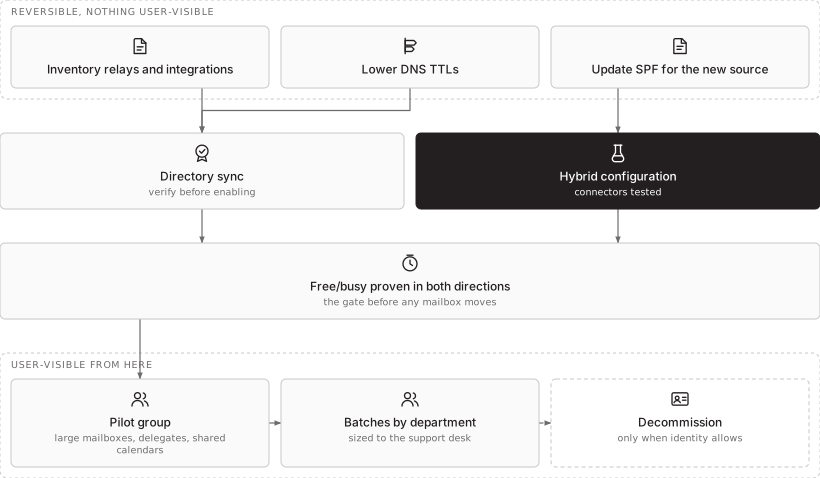
Put the awkward cases in the pilot, not at the end. Delegated access, shared mailboxes, very large mailboxes, mobile devices with saved credentials and anyone who uses a desktop client in a way nobody documented — these produce the support calls, and discovering them in a controlled pilot of fifteen people is vastly cheaper than discovering them in a batch of three hundred.
What hybrid costs to run
Worth stating plainly, because it is usually underestimated: two mail systems means two patch cycles, two certificate renewals, two places a message can be during an investigation, and an on-premise server that is now a security-relevant internet-facing asset with a small user population and a large blast radius. It must stay patched regardless of how few mailboxes remain on it.
If hybrid is a deliberate end state, that is a legitimate decision and should be written down with its reason. If it is the residue of a migration that stalled, it is a cost with no remaining benefit.
How STP approaches this
We establish where identity is authoritative before anything moves, inventory the relays that nobody remembers, update mail authentication ahead of the first cloud send rather than after the first bounce, and put the difficult mailboxes in the pilot. Where a stalled hybrid already exists, we start by documenting what is actually true — which side holds mail flow, which attributes are synchronised, what still depends on the last server — because that is usually the thing nobody can answer.
More on workplace and endpoint services and managed IT, or start a conversation.