

Most AWS cost and reliability problems are not caused by the services chosen. They are caused by a platform that grew one decision at a time, where nobody wrote down what it was supposed to survive or what it was supposed to cost. The design below is the shape we build to, and the reasoning behind each choice, so the trade-offs are visible rather than inherited.
Start from the failure you must survive
Before any service is selected, two numbers get agreed in writing: how long the service may be unavailable, and how much data may be lost. Everything downstream is derived from them.
A single Availability Zone is a single building. Three zones is the default because it is the point at which a quorum-based datastore can lose one and keep writing. A second region is a different question entirely, and most estates do not need it.
- Zones
- three, minimum
- Public surface
- CloudFront and the load balancer, nothing else
- Node subnets
- private, egress through NAT
- Data tier
- Multi-AZ, failover operated by AWS
This diagram as text
- Users — HTTPS
- Route 53 — health-checked
- CloudFront + WAF — TLS terminated at the edge
- AWS one region
- VPC public and private subnets
- Application Load Balancer — public subnets, one per zone — target group per service
- Availability zone a
- EKS nodes — private subnet
- RDS primary — writes
- Availability zone b
- EKS nodes — private subnet
- RDS standby — automatic failover
- Availability zone c
- EKS nodes — private subnet
- Read replica — optional
- VPC public and private subnets
Relationships
- Users → Route 53 — resolve
- Route 53 → CloudFront + WAF — alias
- CloudFront + WAF → Application Load Balancer — origin
- Application Load Balancer → EKS nodes (Availability zone a)
- Application Load Balancer → EKS nodes (Availability zone b)
- Application Load Balancer → EKS nodes (Availability zone c)
- RDS primary ↔ RDS standby — sync
- RDS standby → Read replica — async
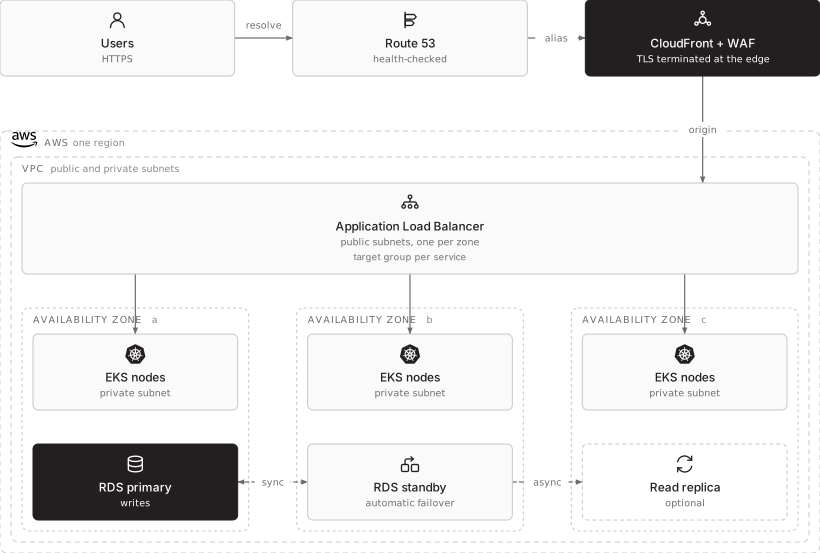
Nodes sit in private subnets. The only things with a public address are CloudFront and the load balancer. This is not a formality: it is what makes the blast radius of a compromised container a lateral movement problem rather than an immediate internet-facing one.
EKS, ECS or Fargate
This is usually discussed as a question about team size and Kubernetes experience. It is not. It is a question about how much the business is willing to be locked in, decided years before the lock-in is felt.
ECS is proprietary. It is a good orchestrator, it is cheaper to operate than a cluster, and it exists only on AWS. Every ECS task definition, every service discovery integration and every surrounding AWS primitive is work that does not move. That is a perfectly reasonable trade when the business is certain it will stay on AWS for the long term, and the certainty has to be real rather than assumed, because the bill for changing your mind arrives as a rewrite.
EKS is Kubernetes. The same substrate runs on another cloud and on hardware in your own room. What EKS buys is that AWS operates the control plane, which is the heaviest and least interesting part of running Kubernetes, while the workloads themselves stay portable. For an organisation that holds to not locking itself into proprietary technology, that is the point: you are renting the operational burden, not the architecture.
ECS when staying is a decision. EKS when leaving has to remain possible.
The second half of that only holds if portability is maintained deliberately. An EKS cluster wired into a dozen AWS-only services through the application code is locked in exactly as firmly as ECS, and has paid the Kubernetes complexity for nothing. Keeping the option open means:
- Infrastructure as code written so the platform can be provisioned elsewhere. The modules are parameterised by provider-specific detail rather than built around it, and somebody has actually stood the platform up somewhere else, at least once, to prove the claim.
- Managed services reached through interfaces the application does not hard-code. A managed database is sensible. A managed database whose proprietary extensions are in the query layer is a migration.
- Portability tested as part of disaster recovery, not as a theory. If the recovery plan says the platform can be rebuilt on another provider, that is a claim with a clock on it, and it is cheap to check once a year.
Done that way, the same manifests and the same pipelines that run on EKS run on GKE or on a cluster on your own hardware, and a provider decision stops being irreversible.
| Choose it when | What you are accepting | |
|---|---|---|
| ECS on Fargate | Staying on AWS is a settled business decision, and you want the least to operate | Proprietary. Moving later is a rewrite, not a migration |
| ECS on EC2 | Same, with predictable load where the instance discount matters | Same lock-in, plus you own the instances |
| EKS with Karpenter | Portability is a requirement, and you want AWS to run the control plane | Kubernetes complexity, an upgrade cadence, and the discipline to stay portable |
| EKS Fargate profiles | Isolation per pod, or bursty jobs you do not want to keep nodes for | Higher unit cost, no DaemonSets, slower start |
A single estate frequently uses two. A common and sensible pattern is EKS for the application platform with a Fargate profile carrying the system namespace, so cluster add-ons are not competing with application pods for nodes and a node problem cannot take out the controllers that would otherwise fix it.
Node provisioning: Karpenter, not fixed node groups
A managed node group scales a fixed instance type between a minimum and a maximum. When a pod cannot be scheduled, the group adds another of the same instance, whether or not that shape fits.
Karpenter watches for unschedulable pods and provisions an instance that actually fits what is pending, choosing across families, sizes and purchase options. The part that produces the saving is consolidation: as load falls, it repacks workloads onto fewer nodes and terminates what is left empty.
What we set, and why:
- Multiple instance families in the requirements, not one. Constraining Karpenter to a single family removes most of its ability to find capacity and to find it cheaply. Constrain on what the workload truly needs — architecture, CPU-to-memory ratio, local storage — and let it choose.
- Graviton where the image supports it. ARM64 instances carry a materially better price-performance ratio. The work is in the build pipeline, not the platform: a multi-architecture image, and a test run that actually exercises the ARM build before it is promoted.
- Spot for anything that can be interrupted, on-demand for what cannot. Karpenter handles the two-minute interruption notice by cordoning and draining, which is only safe if the workload has a PodDisruptionBudget and terminates gracefully. Spot without those two things is how a cost optimisation becomes an incident.
- Consolidation enabled, with a disruption budget. Otherwise repacking can move more pods at once than the application can absorb.
Scaling has three independent axes
Teams routinely conflate these, then wonder why a scaling event did nothing.
- Do not combine
- HPA and VPA on one deployment and one metric will oscillate
- Scale on
- the thing that describes arriving work, not CPU
- Queue consumers
- queue depth, and nothing else
This diagram as text
- Reads
- Requests per second, concurrency, queue depth
- Observed CPU and memory, over time
- Pods that cannot be scheduled
- Horizontal pod autoscaler — HPA
- Vertical pod autoscaler — VPA, recommendation mode
- Karpenter — node provisioning
- Changes
- Replica count — handles traffic
- Resource requests — sets what the scheduler reserves
- Node count and instance shape — supplies the room
Relationships
- Requests per second, concurrency, queue depth → Horizontal pod autoscaler
- Observed CPU and memory, over time → Vertical pod autoscaler
- Pods that cannot be scheduled → Karpenter
- Horizontal pod autoscaler → Replica count
- Vertical pod autoscaler → Resource requests
- Karpenter → Node count and instance shape
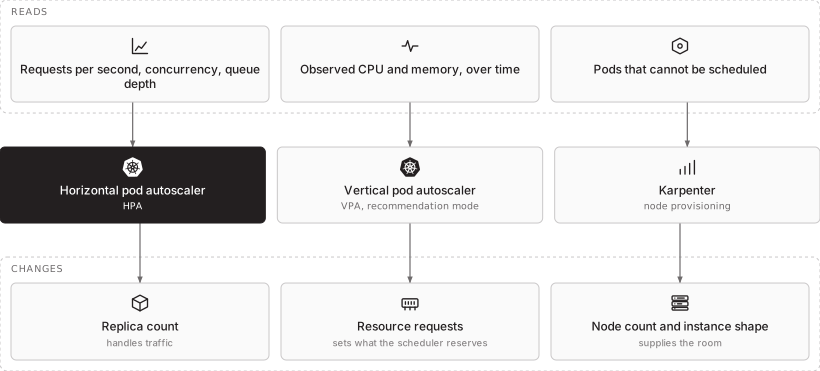
Horizontal scaling on a request-rate or concurrency signal is what handles traffic. CPU is a poor proxy for load in most web workloads and reacts late. For queue consumers, scale on queue depth rather than on anything about the pod.
Vertical scaling is mostly useful as a measurement tool. We run VPA in recommendation mode and use what it learns to set honest resource requests, because requests that are set by guesswork are the single largest source of waste on a Kubernetes bill: every over-stated request reserves capacity that nothing uses and that Karpenter then faithfully provisions.
Deployment without a stored credential
A long-lived AWS access key in a CI secret is the most common serious finding in a platform review. It is valid until someone remembers to rotate it, it is readable by every workflow in the repository, and its use is nearly indistinguishable from legitimate traffic in CloudTrail.
OIDC removes the credential entirely. GitHub presents a signed token describing the repository, the branch and the workflow; AWS validates it against the registered identity provider and issues a short-lived role session.
- Stored keys
- none, anywhere in CI
- Trust pinned to
- repository and branch or environment
- Reviewed as
- Terraform, not a settings page
This diagram as text
- Commit on a protected branch
- The artefact
- Build, test, SBOM
- Scan and sign — severity gate blocks
- ECR — image and signature
- The identity
- OIDC token — repository, branch, workflow
- IAM identity provider — trust policy in Terraform
- Role session — minutes, not months
- Apply to the cluster — the two paths meet here
- Admission control — an unsigned image does not run
Relationships
- Commit on a protected branch → Build, test, SBOM
- Build, test, SBOM → Scan and sign
- Scan and sign → ECR — push
- Commit on a protected branch → OIDC token
- OIDC token → IAM identity provider — present
- IAM identity provider → Role session — exchange
- ECR → Apply to the cluster — pull
- Role session → Apply to the cluster — assume
- Apply to the cluster → Admission control — verify
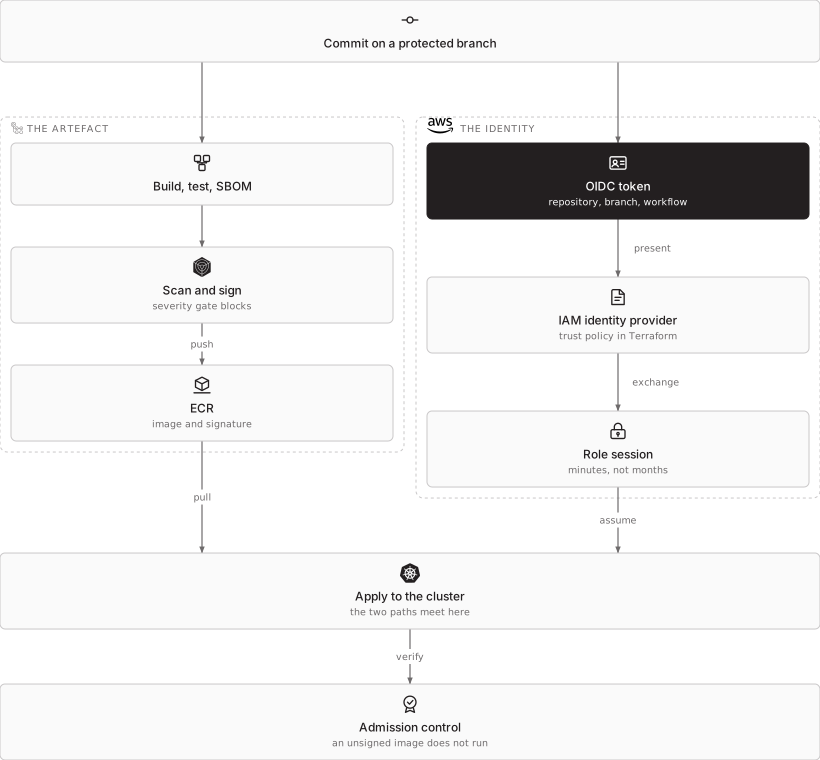
The trust policy is the control. It is pinned to the repository and the branch or environment, so a pull request from a fork cannot assume the production role. It lives in Terraform, which means it is reviewed like code and its history is readable, rather than being a setting somebody changed once.
Inside the cluster, workloads get their AWS permissions through IAM Roles for Service Accounts or EKS Pod Identity. Neither the node role nor a shared secret is the identity, so a compromised pod has the permissions of that service and nothing more.
Secure SDLC, as pipeline stages rather than policy
The controls are only real if they can fail the build:
- Dependency and image scanning on every build, with a documented severity threshold that blocks.
- A software bill of materials generated and retained per release, so the question “are we exposed to this CVE” is answerable in minutes rather than in a day of archaeology.
- Image signing, verified by an admission controller. An unsigned image does not run, which is what makes the registry a control rather than a convenience.
- Infrastructure-as-code scanning before apply, because a permissive security group reaches production exactly as fast as application code does.
- No direct human access to production. Changes arrive through the pipeline. Break-glass access exists, is separately credentialed, and is alerted on.
Each of these produces an artefact with a timestamp, which is the same evidence an ISO 27001 or SOC 2 auditor asks for. That is deliberate: a pipeline built this way is also the compliance evidence, and nobody has to assemble a screenshot pack at audit time.
The Well-Architected pillars as acceptance criteria
A design review that only asks “is it up” accepts a platform that is expensive, unobservable and impossible to change safely. We accept against all six pillars, with a specific question for each.
| Pillar | The question we must be able to answer |
|---|---|
| Operational excellence | Can any engineer deploy and roll back without a person who holds special knowledge? Is every change traceable to a commit? |
| Security | Are there any long-lived credentials? Is every data store encrypted and is the key’s lifecycle owned? Is the blast radius of one compromised pod bounded? |
| Reliability | Has a zone loss been exercised, not assumed? Does the restore meet the stated RTO when timed? |
| Performance efficiency | Are resource requests derived from measurement? Is the scaling signal the thing that actually indicates load? |
| Cost optimisation | What is the cost per environment and per service, and who sees it weekly? What is running at 3am that need not be? |
| Sustainability | Is idle capacity being reclaimed? Are ARM instances used where the image supports them? |
The sixth pillar is not decoration. Consolidation, right-sized requests and Graviton adoption improve the cost and the carbon number through exactly the same mechanism, which makes sustainability the easiest pillar to satisfy once the others are done properly.
When a second region earns its keep
Multi-region is a different class of system, not a bigger version of the same one. It introduces data consistency decisions that multi-AZ does not have, and it roughly doubles the surface that has to be patched, monitored and tested.
It is justified when the recovery time objective is shorter than a rebuild would take, when a regulator requires geographic separation, or when latency to a distant user base is a product requirement rather than a preference.
- Built from
- the same modules, different variables
- Routing
- health-checked DNS failover
- Proven by
- a scheduled, timed failover exercise
- Otherwise
- a standby that never took traffic is not a capability
This diagram as text
- Route 53 — health-checked failover routing
- AWS primary region
- Full capacity — serving all traffic
- Primary database — accepts writes
- Backups — written to both regions
- AWS secondary region
- Reduced capacity — same modules, different variables
- Replica — read-only until promoted
- Backup copy — restorable independently
Relationships
- Route 53 → Full capacity — active
- Route 53 → Reduced capacity — on failure
- Primary database → Replica — async
- Backups → Backup copy
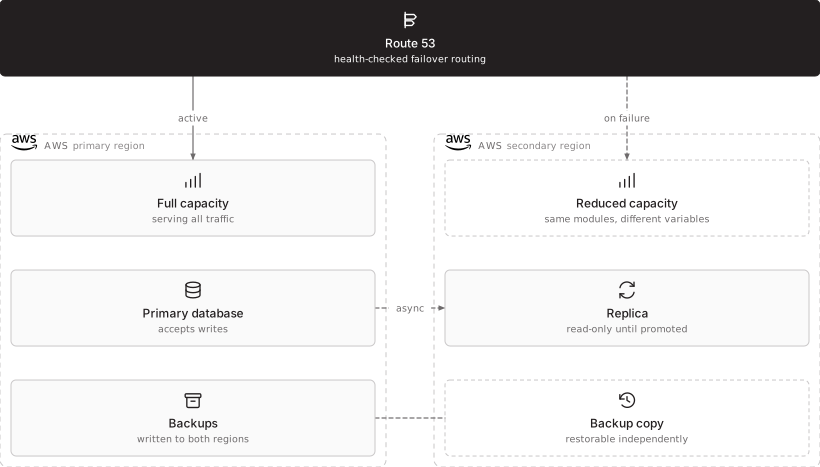
The rule we hold to: a standby region that has never taken traffic is not a disaster recovery capability, it is a second estate to patch. If it is built, it gets exercised on a schedule, and the timing is recorded against the stated objective.
How STP approaches this
We design to the agreed RTO and RPO first and select services second, build the whole estate in Terraform so both regions and every lower environment come from the same modules, wire deployment through OIDC so no AWS key exists in a CI system, and hand over the Well-Architected review as a written document rather than as a verbal assurance. Where a platform already exists, the same review is how we start: it finds the stored credentials, the unbounded requests and the untested restore before it proposes anything.
More on Kubernetes platform engineering and cloud, hybrid and multi-cloud, or start a conversation.